


Voice Recorder & Transcriber
4.5120.00 Reviews
App Specs
- Version
- 1.6.1
- Updated On
- License
- Free
- Downloads
- 1,000,000+
- Developer
- Rhythmix OU
- Categories
- Productivity
- Platform
- Android
Screenshots
 Analysis by AppCompare
I often reach for a recorder when a thought arrives faster than I can type, or when I need to keep a spoken conversation for later reference. Voice Recorder & Transcriber is built around that simple routine: capture audio, turn speech into text, then work with the result. I like that the idea is practical rather than elaborate. It is aimed at people who want a straightforward way to save spoken information, not a full audio-editing studio or a complicated office suite.
Where it fits in a busy day
A useful test for any recorder is whether I would actually open it in the middle of something else. This one makes sense for a quick reminder, a class note, or a conversation where I want to listen again instead of trying to write every sentence down. For example, if I leave a planning meeting with several tasks in mind, I can record a short recap while the details are fresh, then use the text as a starting point for a tidier to-do list. That workflow is more dependable than trusting myself to remember every small commitment.
The transcription option is most helpful when the recording contains information I will need to search through or reuse. A voice memo is quick to make, but replaying a long file just to find one name or decision can be tedious. Text gives me another way to review the material, though I still treat it as a draft rather than a perfect record. Names, specialist terms, overlapping voices, and noisy surroundings are all reasons to listen back and correct the wording.
Choosing it over a basic recorder or a notes app
Compared with a basic phone recorder, the appeal here is the combination of audio and transcription in one place. A standard recorder may be enough if I only need to preserve sound and never revisit it as text. A notes app is better when I already know what I want to write and would rather type than speak. This app sits between those choices: I can capture an idea aloud, then use a transcript to shape it into something more organized.
That middle ground has a trade-off. Transcription adds a useful layer, but it does not remove the need to check the result. If accuracy is critical, such as for a formal interview record or a precise set of instructions, I would keep the original audio and verify important passages before sharing or relying on the text. For a personal reminder or a rough meeting recap, the time saved may matter more than having every word perfectly polished.
A workflow that avoids messy recordings
One practical habit is to say the purpose of a recording at the beginning: “project ideas,” “appointment notes,” or “questions for the next call.” That makes it easier to recognize the file later, even before I have edited the transcript. I would also pause briefly before speaking, keep the phone in a consistent position, and avoid handling it while recording. Those small choices can make the audio easier to understand and the resulting text easier to correct.
For a longer discussion, I would not assume that transcription alone is enough. I would mark down the key decisions or action items as soon as I can, then compare them with the transcript while the context is still clear. The recording preserves what was said; the edited text can become the usable summary. Keeping those purposes separate helps prevent a rough transcript from being mistaken for a finished set of minutes.
Worth Reading Before You Choose

Flipboard Shows What News Apps Must Do Beyond the Feed

Switching to Android Auto Means Rethinking Your Driving Routine

Google Calendar Makes a Crowded Week Easier to Manage

Ludo King Makes the Most of the Minutes Between Plans

Baby Panda World Brings Quick Play to Modern Phones, but Its Game Library Feels Busy

ESPN’s Live Game View Makes Following Close Games Easier
Who is likely to get the most from it
I can see this being useful for students who want to revisit spoken explanations, people who think aloud while planning, and workers who need quick voice notes between tasks. It also suits anyone who finds typing on a phone awkward but still wants their spoken thoughts in a form they can revise. The strongest use case is not “record everything”; it is capturing specific information that would otherwise be hard to remember or inconvenient to write down at the time.
I would skip it if I need a dedicated professional audio workstation, extensive sound processing, or a guaranteed verbatim transcript without review. It is also not the right choice for someone who never wants to manage recordings or edit text afterward. A simple recorder is less demanding if audio alone is enough, while manual notes may be more efficient for short, structured information such as a shopping list.
The app is free to install, with optional in-app purchases listed from $3.99 to $34.99 per item. That makes it reasonable to try for everyday recording, but I would first decide which parts of my routine actually benefit from transcription before paying for anything. Its Everyone age rating is also broad, though that should not be taken as a reason to record other people without considering consent and the setting.
Current product details place it at version 1.4.6, following its May 9, 2025 release. That gives a reader a clear snapshot of where the app stands, but version information alone does not tell me what changed between releases. I would judge an update by whether it improves the parts that matter in real use: starting a recording smoothly, handling speech consistently, making text easy to correct, and keeping saved material manageable.
Existing users should think of each update as a reason to check their own routine rather than assume that a new version changes everything. If recording and reviewing already fit comfortably into the day, the main value is continuity. If something feels awkward, I would test that exact task after updating instead of expecting a version number to promise a particular improvement. For a tool that stores personal conversations and thoughts, I would also keep important recordings backed up in a way I control rather than relying on a single copy.
A Seamless Recording Experience
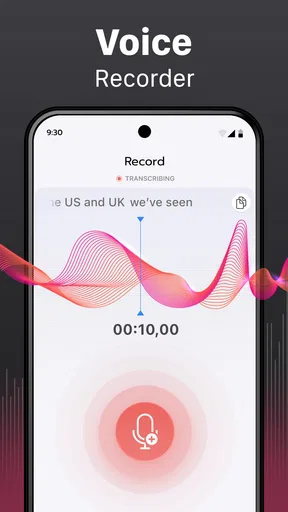
The first thing I noticed when I fired up the Voice Recorder & Transcriber app was its sleek and intuitive interface. No need to fumble around with complex menus; everything is just a tap away. The app opens directly to the recording screen, making it super easy to start capturing audio on the fly. I love that there's no unnecessary clutter – just a big, friendly record button begging to be pressed.
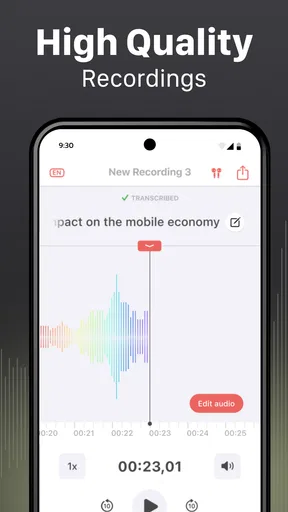
Recording quality is top-notch, offering crystal-clear audio that's perfect for everything from quick voice memos to more formal interviews. I tried it out in a variety of settings, from my quiet home office to a bustling café, and it handled background noise like a champ. The app also offers various audio formats, so you have the flexibility to choose what works best for your needs.
Transcription That Works Like Magic
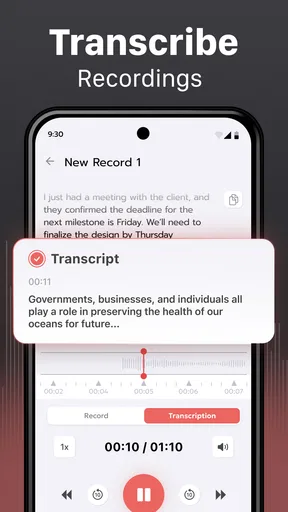
Now, let's talk about the transcription feature, which is where the app truly shines. Once you've recorded your audio, transforming it into text is as simple as tapping a button. The accuracy of the transcriptions is impressive, thanks to the app's advanced speech recognition technology. It even recognizes different accents fairly well, which is a huge plus for anyone working in a multicultural environment.
As someone who hates typing out long notes, this feature felt like a game-changer. I tested it by recording a 10-minute meeting and was amazed at how quickly and accurately it converted my speech into text. There's also a handy option to edit the transcription, so you can make tweaks on the fly.
User-Friendly Features That Stand Out
Aside from its core functions, the app comes packed with a few nifty features that make life easier. You can organize your recordings with tags and categories, making it a breeze to find what you need later. Sharing your recordings and transcriptions is also seamless, with options to send them via email, cloud services, or even social media.
Another feature I appreciate is the ability to set up automatic backup. It gives peace of mind knowing that even if I lose my phone, my recordings are safe and sound in the cloud. The app is also lightweight, ensuring it doesn't hog precious storage space on your device.
Final Thoughts
All in all, the Voice Recorder & Transcriber app is a must-have tool for anyone who needs a reliable way to capture and convert audio on the go. Whether you're a student, journalist, or just someone who needs to keep track of ideas, this app has got you covered. Its blend of simplicity and powerful features makes it a standout choice in the crowded app market.
In a world where time is of the essence, having an app that can streamline your workflow and keep you organized is invaluable. So, if you're in the market for a dependable voice recording and transcription solution, look no further than this gem. Trust me, your productivity will thank you.
How it measures up for everyday use
The app is developed by Albert Gerassimov and belongs to the productivity side of the app world, where small time savings can add up. It has a 4.6 average from around 3,200 ratings, and has passed 500,000 installs. Those figures suggest that plenty of people are willing to try it, but they do not settle whether its particular workflow suits me. I would focus on whether I often need both a recording and editable text, since that is the distinction that matters more than popularity.
There are a few questions I would answer before making it part of a regular work routine. Can I rely on transcription without checking it? I would not: I would review anything where names, figures, or exact wording matter. Is it useful if I only need a ten-second reminder? It can be, but a typed note may be faster when the information is already clear in my head. Is it appropriate for sensitive conversations? I would consider who is present, ask permission when needed, and avoid treating a phone recording as automatically private.
What I would watch as it develops
The most meaningful future improvements would be the ones that reduce the effort between recording and finding a useful result. For my own use, that means dependable transcription, clear editing, and a simple way to keep recordings recognizable as the library grows. I would also value a workflow that makes it easy to distinguish an untouched recording from a corrected transcript, because those are different kinds of reference material.
For now, I would recommend trying it with low-stakes tasks first: a spoken idea, a personal reminder, or a recap of a conversation where a rough transcript is enough. If that feels natural, it may earn a place in a broader routine. If I find myself constantly correcting text or searching through unlabeled audio, I would switch to a simpler recorder or a notes tool better matched to that job. The best reason to keep it is the practical bridge between speaking and usable text, not a promise that every recording will arrive perfectly organized.
Pros
- High-quality audio recording.
- Easy transcription feature.
- User-friendly interface.
- Supports multiple formats.
- Syncs with cloud services.
Cons
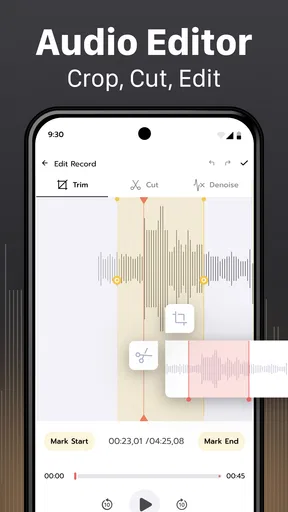
- Limited editing tools.
- Ads in free version.
- No dark mode option.
- Requires internet for transcribing.
- Limited free storage.
FAQs for Voice Recorder & Transcriber
How does the Voice Recorder & Transcriber app work?
The app allows users to record audio with high-quality sound and then transcribe the recordings into text. It uses advanced speech recognition technology to ensure accuracy. Users can start recording with a single tap and access transcriptions within minutes, making it ideal for meetings, lectures, and personal notes.
Is the app available on both Android and iOS?
Yes, the Voice Recorder & Transcriber app is available for both Android and iOS devices. Users can download it from the Google Play Store or the Apple App Store. It is optimized for various devices, ensuring a smooth user experience regardless of the platform.
What languages does the transcription feature support?
The app supports multiple languages for transcription, including English, Spanish, French, German, and more. Users can select their preferred language from the settings menu. Continuous updates are made to enhance language support and add new languages based on user demand.
Are there any limitations to the recording length?
The app allows for unlimited recording length, constrained only by the device's storage capacity. However, for optimal performance, longer recordings may require more processing time for transcription. Users can manage their recordings and storage settings through the app's intuitive interface.
Is my data secure with this app?
Yes, the app prioritizes user privacy and data security. All recordings and transcriptions are stored locally on the device unless the user opts to back them up to a secure cloud service. The app employs encryption to protect data during transmission and storage, adhering to industry standards.


